Step 1 — Register your account
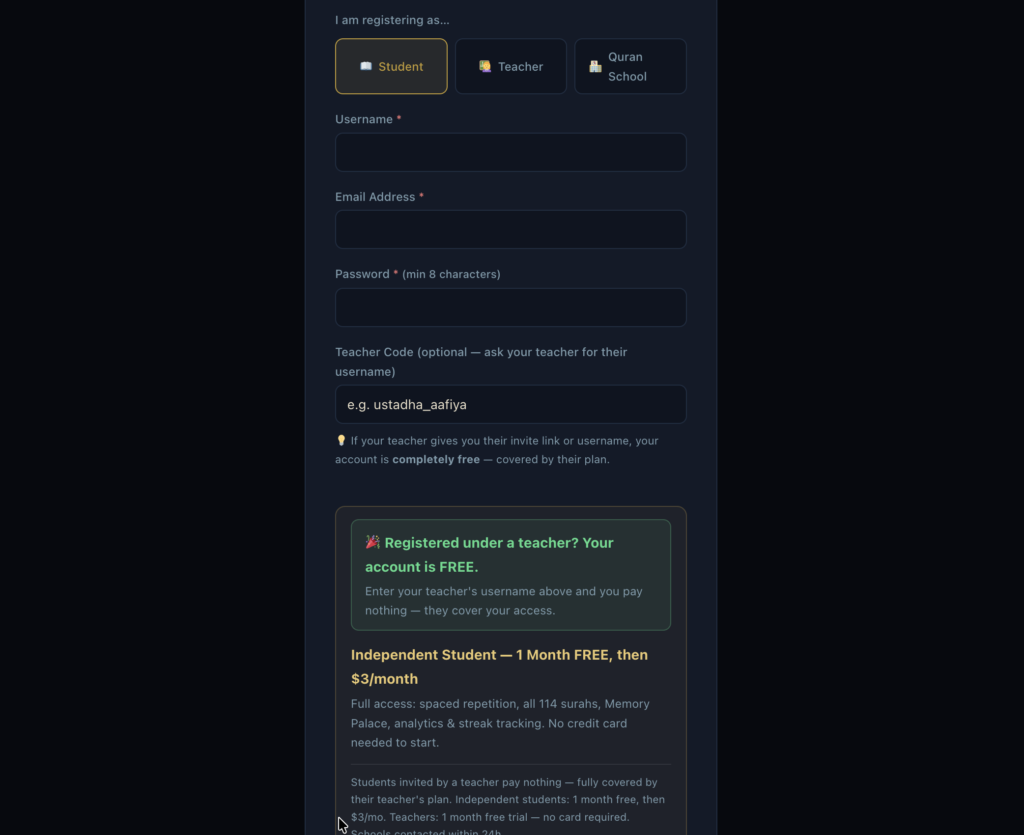
- If you are an independent student, go to https://hifziq.com/register/ and choose “Student” as your role. You get 1 month free.
- If you are under a teacher, use the invite link your teacher sent you — don’t register on your own. That link auto-links you to your teacher and your access is free (covered by their plan).
- Fill in your name, email, username, and password → click Create Account.
Step 2 — Log in and open your Dashboard
- Go to https://hifziq.com/login/
- Enter your username and password → click Sign In.
- You will be taken to your Student Dashboard automatically.
Here is the dashboard link – https://hifziq.com/dashboard/
Step 3 — Understand your Dashboard
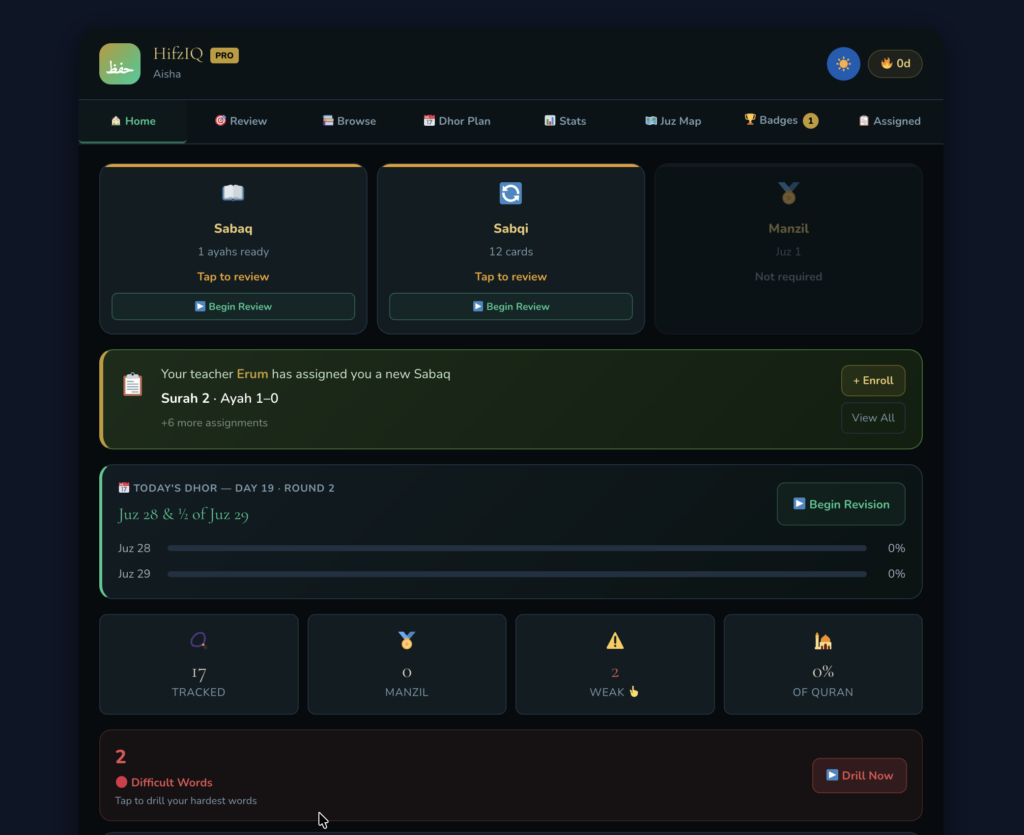
Your dashboard has three tiles at the top:
- Sabaq — today’s new memorisation session
- Sabqi — yesterday’s revision session
- Manzil — long-term revision of older portions
The Traditional System
Sabaq — New Lesson
Sabaq literally means “lesson.” This is the fresh portion you are memorising today for the first time. Your teacher assigns you a set of ayahs — maybe 5, maybe 20, depending on your level — and you memorise them from scratch in that session.
The challenge with Sabaq is that new memories are fragile. They haven’t been reinforced yet. If you memorise something today and don’t revisit it soon, most of it is gone within 24–48 hours.
Sabqi — Recent Revision
Sabqi means “the previous.” This is everything you memorised in the last few days — roughly the last 7 to 20 days depending on the tradition. You recite it to your teacher every day until it becomes solid.
The purpose of Sabqi is to catch the memory before it fades. You just learned it — it’s still fragile — so you keep coming back to it while it’s in that vulnerable window.
Manzil — Old Revision
Manzil means “destination” or “portion.” This is your older memorised content divided into chunks — typically the whole Quran divided into 7 parts, so you cycle through the entire Quran once a week. What you memorised months or years ago lives here.
Without Manzil, students typically lose 60–80% of their older memorisation within a year, even if their new memorisation is perfect. Manzil is what keeps the whole edifice standing.
The Science Behind It
The Forgetting Curve
In the 1880s, psychologist Hermann Ebbinghaus discovered something uncomfortable — humans forget roughly 70% of new information within 24 hours if they don’t review it. Within a week, almost nothing remains without reinforcement. This is the Forgetting Curve.
The only way to fight it is spaced repetition — reviewing information at increasing intervals over time. Each time you successfully recall something, the memory trace gets stronger and the next review can be pushed further into the future.
Now look at the traditional system through this lens:
- Sabaq = first encoding (day 0)
- Sabqi = reviews at day 1, 2, 3… while the memory is still fragile and before it drops off the forgetting curve
- Manzil = long-interval reviews weeks and months later, when the memory is stronger but still needs maintenance
The scholars who designed this system had no access to neuroscience. They arrived at the same conclusion through pure observation — students who followed all three tiers retained their Hifz for life. Students who skipped Sabqi or Manzil didn’t.
Active Recall
Modern research shows that retrieving a memory strengthens it far more than re-reading it. This is called the Testing Effect — the act of being tested on something, struggling to recall it, and getting it right produces deeper memory traces than passively going over it again.
The traditional Hifz method is almost entirely built on active recall. You don’t read your Sabqi from the mushaf — you recite it from memory to your teacher. That moment of effort and retrieval is exactly what locks it in. HifzIQ replicates this with flashcard-style review where you recall before you see the answer.
How HifzIQ Maps to This
| Traditional | Science | HifzIQ |
|---|---|---|
| Sabaq | First encoding | New cards added to your deck |
| Sabqi | Short-interval spaced repetition | Cards scheduled for review in days 1–14 |
| Manzil | Long-interval maintenance | Cards that have matured, reviewed weeks/months later |
| Rating yourself honestly | Active recall + feedback | The 1–5 quality rating after each card |
The rating is critical. When you rate a card 1 or 2 (forgot or struggled), HifzIQ shortens the interval and brings it back sooner. When you rate it 4 or 5 (easy), it pushes the next review further out. This is the SM-2 algorithm — the same engine used by Anki and other spaced repetition tools — running underneath a framework that Hifz teachers were already using intuitively for a thousand years.
The beautiful thing is that the traditional ulama got it right without labs or data. The science just explains why it works.
Ok now, Click any tile to start that session for the day.
When your teacher assigns you the sabaq- you see it here :
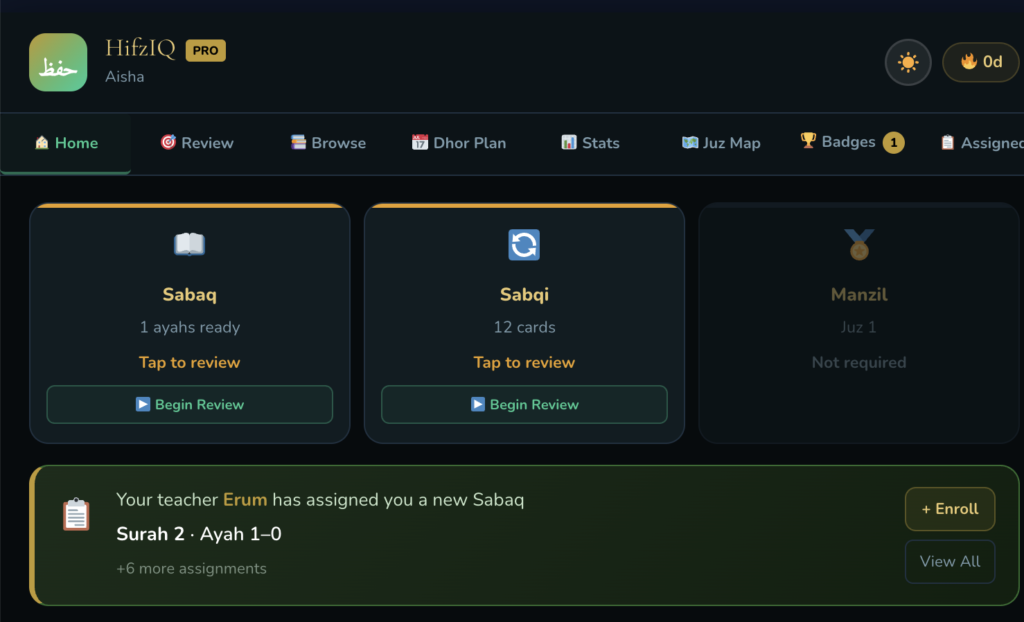
Keep on revising and marking it perfect . choose new sabaq,or do old sabq revision (sabaqi)
Step 4 — Start your Sabaq (new memorisation)
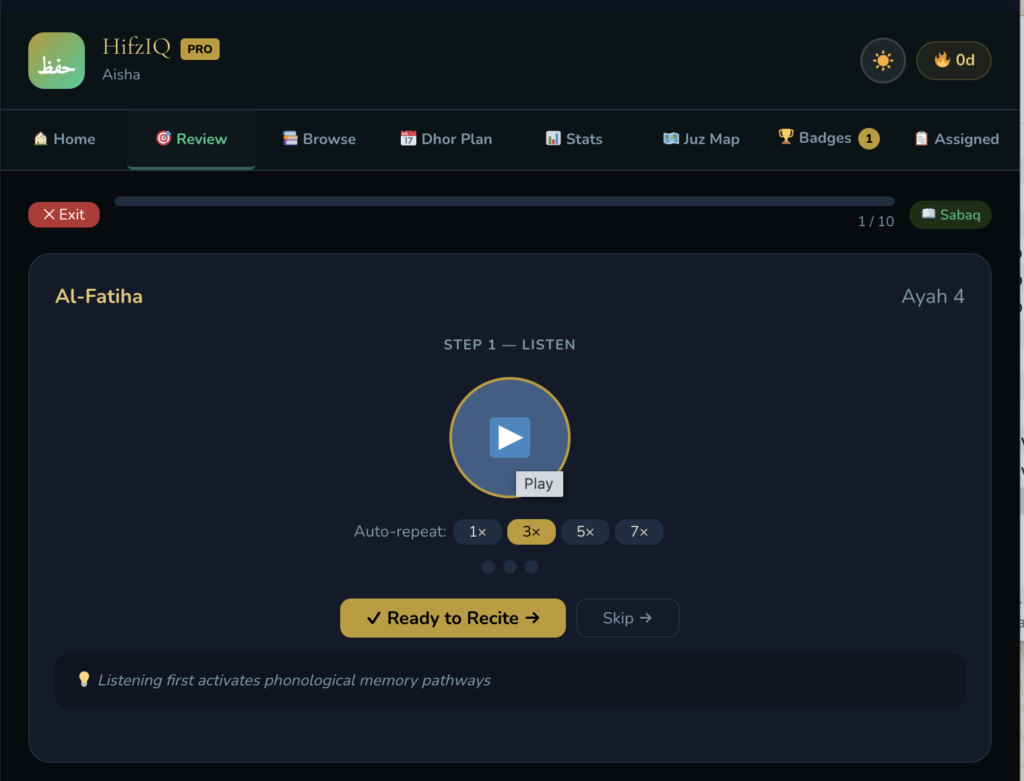
- Click the Sabaq tile.
- The ayahs assigned by your teacher will appear.
- Listen to the ayah again and again and when you are ready click on ready to recite
- Rate how well you recalled it: 1 (forgot) to 5 (perfect).
- HifzIQ uses spaced repetition (SM-2 algorithm) — it schedules your next review automatically based on your rating.
- Keep going until all Sabaq cards are done.
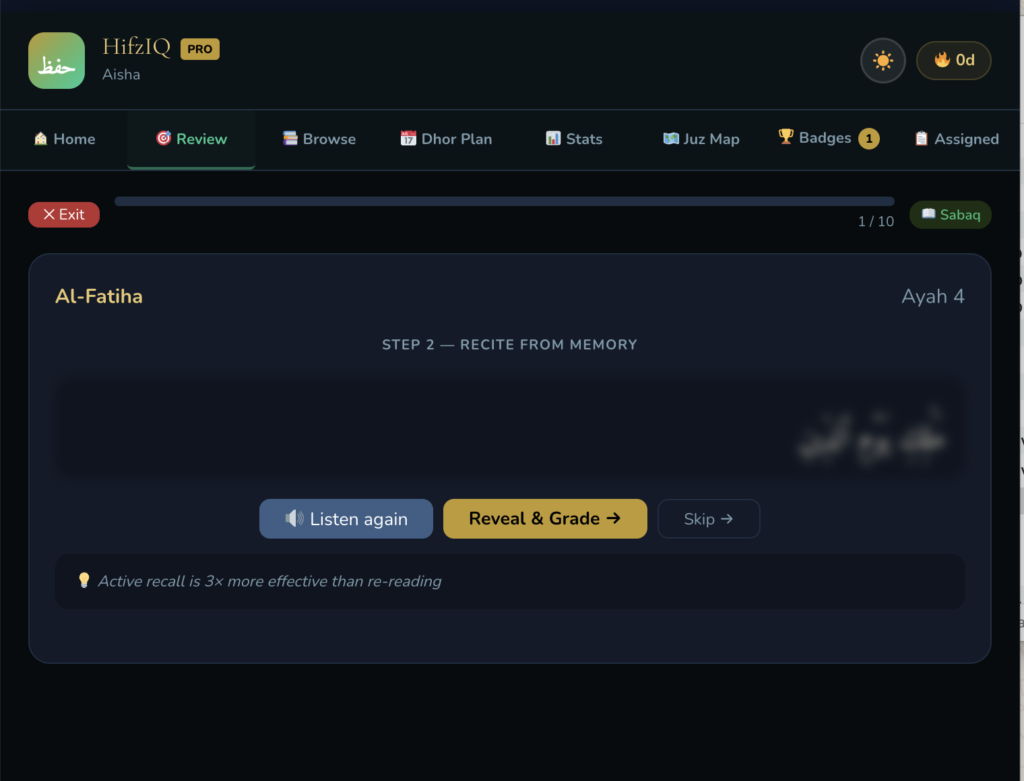
Reveal and grade
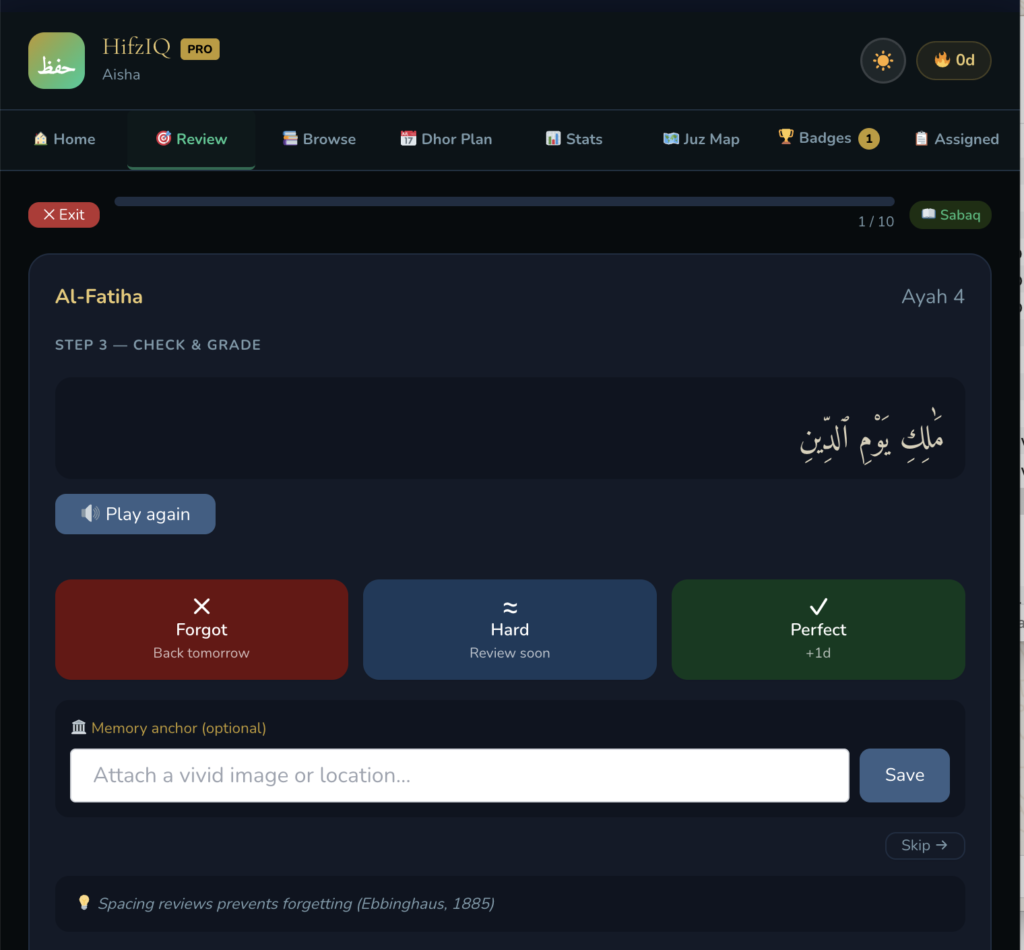
If it was correct mark Perfect. If you made mistake- mark Hard
You can also put memory anchor to an ayah.
Memory anchor is a technique where you attach a new piece of information to something you already know very well — so your brain has a “hook” to hang the new memory on.Think of your existing knowledge as a wall. A memory anchor is the nail you hammer into that wall, so the new memory doesn’t just float around and get lost — it hangs onto something solid.
A simple example from Quran memorisation:
Say you’re struggling to remember which surah comes after Surah Al-Fajr. Instead of just repeating the name 50 times, you anchor it:
“Fajr is dawn. Dawn is the beginning of the day. Al-Balad means ‘the city’ — cities wake up at dawn.”
Now Al-Balad is anchored to Fajr through a logical image. Your brain didn’t just memorise a word — it built a connection.
Why it works:
Your brain doesn’t store information like a hard drive — it stores it as a web of connections. The more connections a piece of information has, the easier it is to retrieve. A memory anchor is literally just creating one more connection on purpose.This is why you can forget someone’s name but never forget their face — the face is connected to a real sensory experience (an anchor), while the name was just a floating sound.
Common types of memory anchors:
- Story anchor — turn the information into a mini story
- Image anchor — attach a vivid picture to it in your mind
- Location anchor — imagine the information sitting in a familiar place (this is the Method of Loci / Memory Palace)
- Emotion anchor — attach a feeling or personal meaning to it
- Sound anchor — link it to a rhyme, rhythm, or familiar tune
Step 5 — Complete your Sabqi (recent revision)
- Click the Sabqi tile.
- These are ayahs you memorised in the last few days.
- Same process — read, recall, rate.
- Aim to complete this every day before moving to Sabaq.
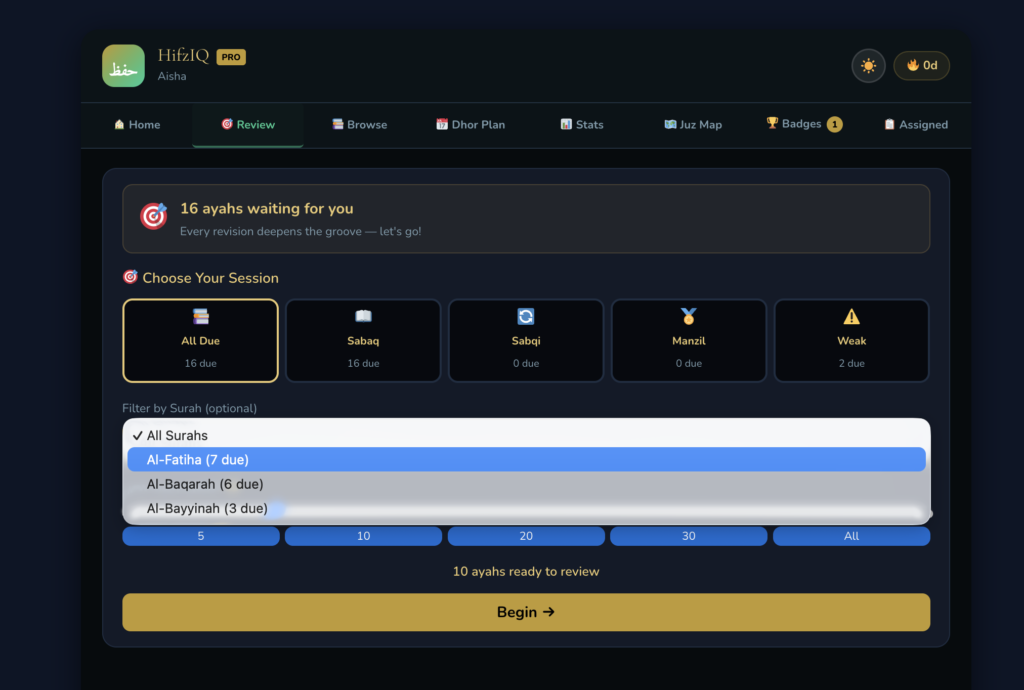
Step 6 — Complete your Manzil (old revision)
- Click the Manzil tile. (Advances students)
- These are ayahs from older portions (the juz assigned by your teacher).
- This keeps long-memorised portions strong and prevents forgetting.
Step 7 — Check your Streak and Progress
- After completing sessions, your streak counter updates at the top.
- You can see how many days in a row you have been consistent.
- Your teacher can also see your progress — so consistency matters!
Step 8 — View your Weak Ayahs
- On your dashboard, scroll down to see Weak Ayahs — these are ayahs you rated low (1 or 2) multiple times.
- Pay extra attention to these in your personal revision.
Step 9 — Check your Attendance
- Your teacher marks attendance every session.
- You can see your attendance record on the dashboard.
- If you miss a class, your streak may be affected — so show up consistently!
Step 10 — Message your Teacher
- If you have a question or need to inform your teacher about an absence, use the Messages section on your dashboard.
- Type your message and send — your teacher will see it on their dashboard.
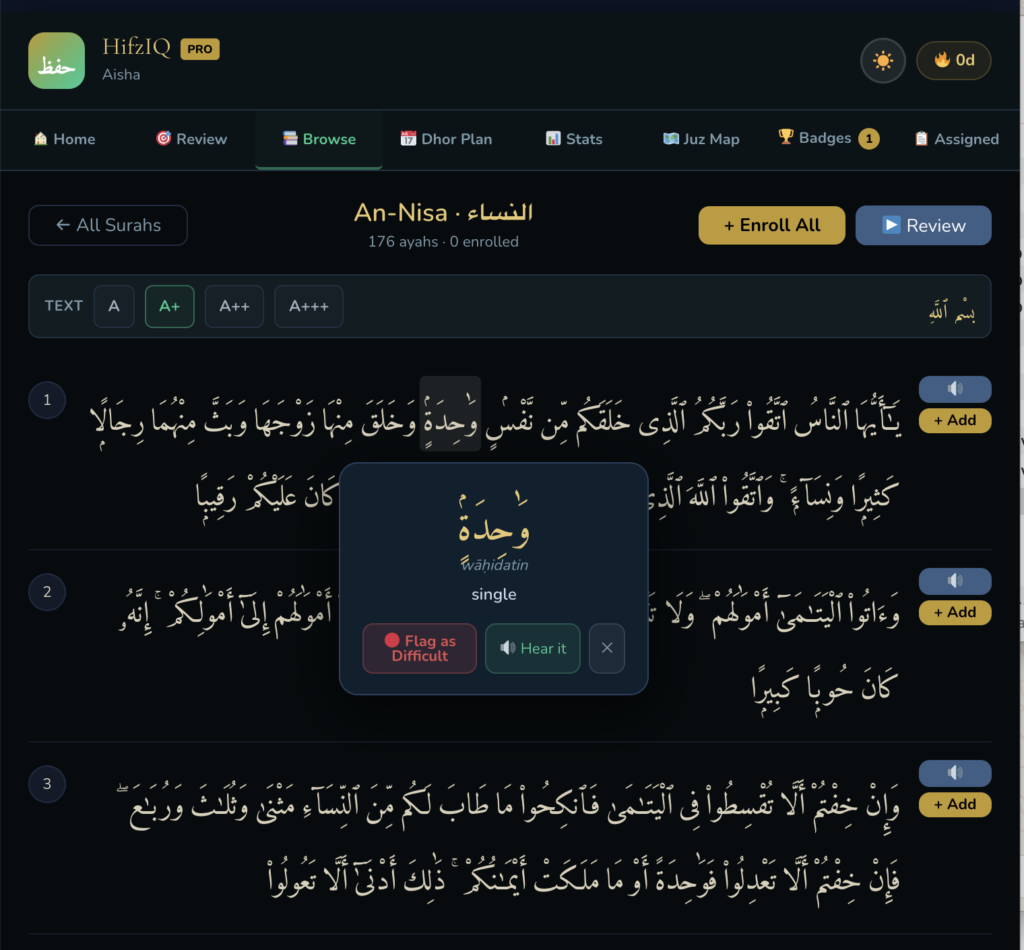
The Surah you’re looking at
You are inside Surah An-Nisa (النساء) — it has 176 ayahs and currently 0 are enrolled (meaning you haven’t added any to your memorisation deck yet).
The two buttons at the top right
- + Enroll All — adds all 176 ayahs of this surah to your review deck in one tap. Use this if your teacher has assigned the whole surah.Otherwise don’t add them yourself else your sabaq will have all the ayah. ( If you have already added all ayah and you want to reset it – message the admin at- admin@hifziq.com for reset.
- ▶ Review — starts a review session for whatever ayahs you have already enrolled from this surah.
The font size buttons (TEXT / A / A+ / A++ / A+++)
These just change how big the Arabic text appears on your screen. Pick whatever size is comfortable for your eyes. A+ is currently selected.
The ayah list
Each numbered row (1, 2, 3…) is one ayah of the surah. On the right side of each ayah you have:
- 🔊 audio button — tap to hear the ayah recited
- + Add — adds just that single ayah to your memorisation deck
So if your teacher assigned only specific ayahs (not the whole surah), use + Add on each one individually.
The popup in the middle — this is the word tool
You tapped on the word وَحْدَةً in Ayah 1. The popup shows:
- The word in large Arabic text
- Its transliteration: wāhidatin
- Its meaning in English: single
- 🔴 Flag as Difficult — if this word trips you up every time, flag it. HifzIQ will track it and show it to your teacher so they can help you with it.
- 🔊 Hear it — plays the pronunciation of just that one word in isolation
- ✕ — closes the popup
This word tool is extremely useful. If there’s a word in an ayah whose meaning or pronunciation you keep forgetting, tap it, read the meaning, hear it, and flag it if needed. Understanding the meaning of words helps them stick far better than just repeating sounds.
The tabs at the top
- 🏠 Home — your main dashboard with today’s sessions
- 🎯 Review — start your Sabaq/Sabqi/Manzil review sessions
- 📋 Browse — where you are now — explore surahs and enrol ayahs
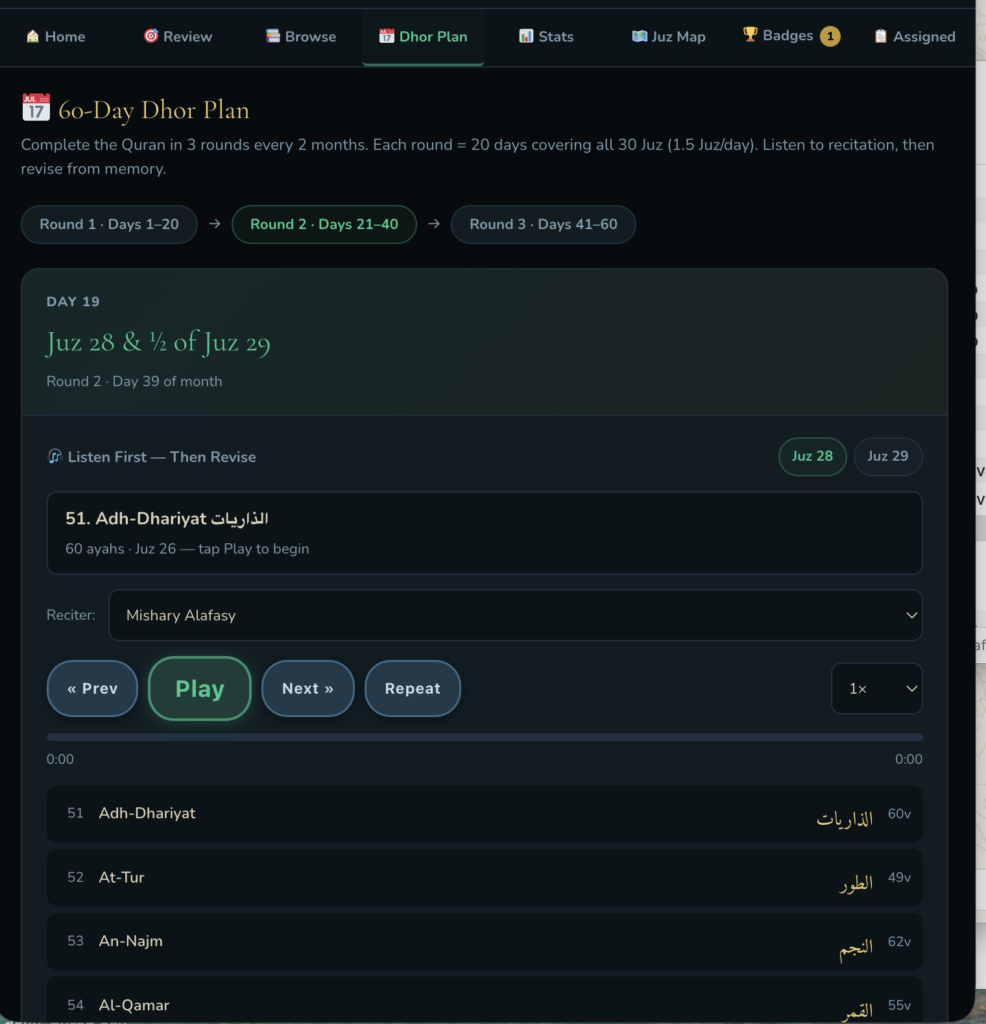
- 📅 Dhor Plan — your revision schedule
- 📊 Stats — your progress and consistency data
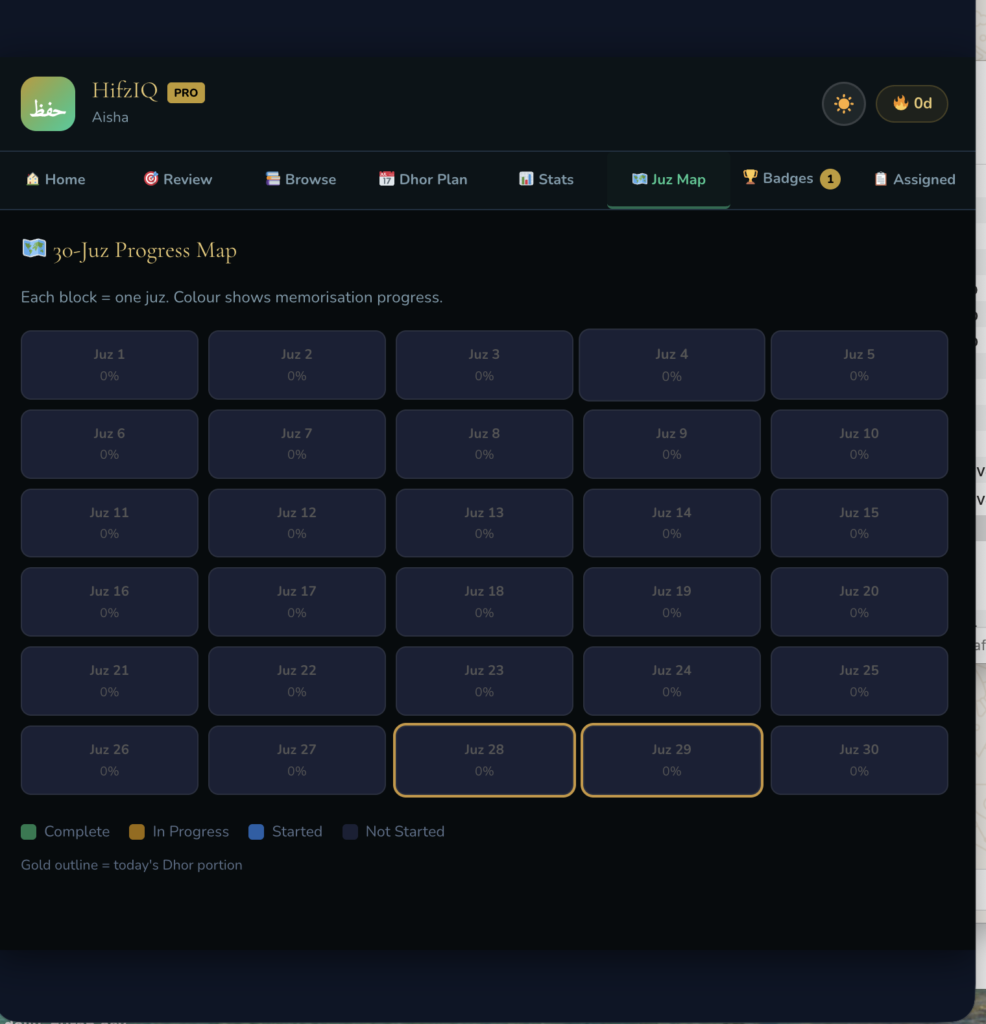
- 🗺️ Juz Map — visual overview of your memorisation across the whole Quran
- 🏆 Badges — achievements (you have 1 badge already, masha’Allah!)
- 📌 Assigned — ayahs your teacher has specifically assigned to you
In short — what to do on this screen:
- Browse to the surah your teacher assigned
- Either tap + Enroll All or use + Add on specific ayahs
- Tap words you don’t understand to see their meaning
- Flag words that are difficult so your teacher knows
- Once enrolled, go to Review to start memorising
What is special about Dhor Plan
Dhor plan helps you in revising Quran every 20 days. Even if you are not doing Hifz you can play the recitation and follow in your mushaf to complete the reading of Quran every 20 days that means 3 Quran in 60 Days.
Progress: Juz map shows you your progress- how much you have memorised.
Badges will help you see the badges you have earned